
Tools
Concept
Download
Services
Individual Support
Annotation Studio Server Hosting
Integration Services
Tutorial Media
Using Clip Markers in Final Cut Pro
Final Cut Pro
Final Cut Pro X
AE Subtitle in Detail
DVD Studio Pro
DVD Studio Pro - CC
QuickTime CC
Support for Adobe Premiere and After Effects CS5
Import captions from movies
Closed caption movies
Repurposing closed captions
Synch to burnt-In timecode (pt. 1)
Synch to burnt-In timecode (pt. 2)
Pedestrian Closed Captions Roll-up
Closed captions in web browser
Pedestrian Closed Captions
Preparing Closed Captions
Using Transcripts
QuickTime Subtitles
Pedestrian Crossing - German Subtitles
Open subtitles for iPhone and iPod
Star Wreck - In the Pirkenning
iPhone - Hello Subtitle
Flash Player 1
Flash Player 2
iPhone - Hello
Contact
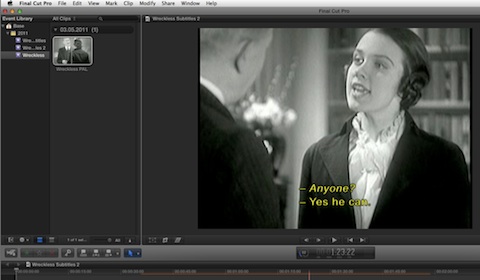
Annotation Edit and Final Cut Pro X 10.0.1
Annotation Edit now supports Final Cut Pro X 10.0.1 XML
You can either export subtitles as rendered images or title effects.
Any Final Cut Pro X title effects can be imported into Annotation Edit for subtitle preparation.
The PDF here shows the required steps one, two and three.
Please install the new Image Export Plugin ( vs. 1.9.9) from the Annotation Edit distribution package, before you try it on your own.
Links
Export Subtitles to Final Cut Pro X
(3.2 MB)